What is MBR | Understanding the Master Boot Record

What is Master Boot Record(MBR)?

MBR stands for master boot record. The data located in the first sector of a hard drive or removable drive is known as the master boot record(MBR) In order for the computer's main storage or random access memory to be booted called as loaded, it must know how and where the system operating system(OS) is located(RAM). A program that read the boot sector record of the partition containing the OS booted is also included in the MBR. The programme that loads the remainder of the OS into RAM is then contained in that record. 

As compared to On a GPT(GUID partition table), Windows can have up to 128 partitions without building extended partitions and support drive larger than one million terabytes. On the other hand, An MBR only supports the four standard or primary partitions and also does not support drives larger than 2 TB. An MBR must expand the partitions in order to support additional logical partitions. You can check out more differences related to this two drives, and learn more about MBR vs GPT in this article.

There are three main parts of the Master boot record

Master boot routine

The variable load coder, which the MBR needs, is part of the 446-byte master boot routine. The MBR transfers control to the operating system listed in the partition table once the hard drive has been booted.

Table of Disk partitions(DPT)

Storage device partitions are described in the partition table. In each hard drive, the first sector(cylinder 0, head 0, and sector 1, MBR) is where the disk partition table is found. Each partition entry is 16 bytes long, giving the partition table a total length of 64 bytes. Therefore, an MBR disk can have a maximum of 4 partitions. Users can create extended partitions which can be divided into multiple logical drives if they require more partitions.

Code of identification

The MBR can be recognised by its identification code. It has a value of AA55H or 55AAH in 2 bytes.

Thank you for reading this article. Still, if you have any questions or queries in your mind on the What is MBR then please ask us in the comment section below.


SIMM vs DIMM Memory Modules: What’s the Difference?

SIMM stands for single in-line memory module while DIMM stands for Dual in-line memory module. SIMM and DIMM are two major types of random access memory standards for personal computers.  Installing the dual inline package(DIP) chip is challenging, SIMM and DIMM memory modules were created to replace DIP chips. Each type of RAM has a name that describes the unique way that the memory is packaged. Read the article to learn more about the comparison and difference between SIMM and DIMM.

Learn more about CPU Vs RAM

What is SIMM?

A RAM module called a single in-line memory module(SIMM), is a small circuit board with one or more RAM chips connected to the computer motherboard by pins. Gold or tin color metal is used to make the SIMM connectors and the motherboard slot. If the slot connector is made of gold and the SIMM connector is, too, then neither metal should be used for the slot connector. Only one set of metal connectors at each of the bottom edges of the card is active at any given time, but they function well through the card.

Learn more about RAM Vs Cache

What is DIMM?

While the metal connector on a DIMM (Dual Inline Memory Module) is similar to that on a SIMM, neither side of the connector is reliant on the other. Modern motherboards employ 168,184, and 240-pin DIMMS.The printed circuit modules are intended for use in computers, workstations, printers, servers, and other gadgets. DIMM started to displace SIMMs as the most common type of memory module.

SIMM Vs DIMM | Difference between SIMM and DIMM

  • SIMM stands for the single in-line memory module, and DIMM stands for the Dual in-line memory module.
  • SIMM is installed in pairs, But DIMM is installed one at a time.
  • SIMM module was released in 1983 and it was used on PCs throughout the 1980 and 1990s. DIMM came along in the 2000s to address limitations that arose with advancing technology.
  • SIMM supports 32-bit channels for data transfer, But DIMM supports 64-bit channels for data transfer.
  • The pins present in SIMM on either facet are connected, The pins in DIMM are freelance in nature.
  • SIMM consumes power of 5 volts, While DIMM consumes power of about 3.3 volts.
  • SIMM is an old technology, Whereas DIMM is a replacement for the SIMM module.
  • The most common pin configuration of the SIMM module is 72 pins, In contrast, the most common pin configuration of the DIMM module is 168 pins.
  • SIMM provides storage space of about 4 MB to 64 MB, But DIMM provides storage of 32 MB to 1 GB.
  • SIMM can be used by early Pentium computers as well as by 486 CPU, DIMM is generally used by modern Pentium computers.
  • SIMM has single notches in it, Whereas DIMM is two notches in this module.
  • SIMM measures 4.25 inches in length and 1 inch in width. This module measures roughly 1.67 to 5.25 inches in length and 1 to 1.75 inches in width.

Thank you for reading this article. Still, if you have any questions or queries in your mind on the SIMM Vs DIMM then please ask us in the comment section below.

Explore more information:

MPEG vs MP3: What’s the Difference and Which Format Is Better?

MPEG stands for Moving pictures experts group. MP3 stands for MPEG-1 Audio layer 3. The majority of people are very familiar with the file format MPEG and MP3. As the formats for encoding them, these two are utilised in media players. The kind of media they are used is the primary difference between MPEG and MP3. MPEG is a standard that deals with both audio and video and how they are compressed or modified in order to obtain a desirable balance between size and quality. In contrast, MP3 only works with audio, more specifically, lossy audio files, which quickly gained popularity with the advent of portable music players, also known as MP3 players. Now let us have deep insight into the comparison and difference between MPEG and MP3.


What is MPEG?

The moving pictures experts group called MPEG was founded in 1998. It had only 500 members at first, but as MPEG's popularity grew, the group's membership grew as well. Compressing and sending media files of the audio and video variety was their primary goal. Audio and video files were compressed using MPEG to make them more portable on storage devices. However, the quality of the file is unaffected by the file's size compression. It's still there. It appears that CDs and VCDs are where these compressed files are kept.

Key Features of MPEG:
  • It supported both audio and video. 
  • It offers high compression with good quality. 
  • It is used in streaming services, DVDs, cameras, and mobile devices. 
  • It is more flexible and advanced than older formats. 

What is MP3?

A more compact version of the large-format MPEG is MP3. Its abbreviation is MPEF-1 audio layer 3. The primary objective of the MP3 introduction was the compression of audio files only. This is the MPEG-1 component that handles audio-only media files separately. Lossy audio files are compressed and managed using MP3 for storage in media players. The portable media players that were well known at the time MP3 was introduced could only store compressed files in this format. Other formats, like AAC and WMA, have taken their place.

Key Features of MP3:
  • It is only audio format.
  • It is small file sizes.
  • It is supported by all devices and media players.
  • It is lower quality than modern formats like AAC or FLAC. 

MPEG Vs MP3 | Difference between MPEG and MP3

Meaning

MPEG stands for Moving pictures experts group. MP3 stands for MPEG-1 Audio layer 3 and is a part of the larger MPEG format.

Released Date

MPEG was released in 1998, and MP3 was released in 1991.

Aim

The main aim of MPEG was to set a standard for audio and video compression for ease in the portability of these files through VCDs and DVDs. The file size was reduced such that they could fit in the file size of CDs.

Deal with

Both MPEG and MP3 deal with audio files. The difference between the two arises since MPEG also deals with video files but that is not possible for MP3. On the other hand, MP3 was aimed at patented encoding format of transmission and compression of audio files.

Main usage

MPEG was widely used for media file management and compression so that the files could be managed to a desired size without sacrificing the media file's quality. While lossy audio files that became popular during the era of portable music players were compressed using MP3.

Popularity

MPEG still has widespread use even if there have been many advanced compression to take over the job. While MP3 has been replaced by more recent versions like MP4 and has been put on hold, MPEG is still widely used for the compression of media files.

Thank you for reading this article. Still, if you have any questions or queries in your mind on the MPEG Vs MP3 then please ask us in the comment section below.

Explore more information:

  1. Pros and cons of  MP3
  2. iPod Vs MP3
  3. OGG Vs MP3
  4. M4A Vs MP3
  5. WAV Vs WMA 
  6. AIFF Vs Wav
  7. OPUS Vs FLAC
  8. OPUS Vs AAC
  9. Difference Between Audio CD and MP3 CD
  10. Difference between MP4 and MP3

SDRAM vs DDR: Key Differences, Performance & Which Is Better

SDRAM stands for Synchronous DRAM (Dynamic random access memory). DDR stands for Double data rate (Extended version of SDRAM). DDR1, DDR2, and DDR3 are new SDRAM variations. Computer use memory integrated circuits called SDRAM and DDR  are two different types of RAM. Now let us have deep insight into the comparison and difference between SDRAM and DDR.

What is SDRAM?

When compared to a typical DRAM, SDRAM is a type of DRAM that can operate at a faster rate. Samsung introduced SDRAM for the first time in 1993. Although SDRAM is inexpensive and has a straightforward design, the manufacturing process is quite complicated. SDRAM need more power to operate. They need frequent data refreshing because they are a form of dynamic random access memory. SDRAMs, however, are more productive. Its synchronisation with the CPU clock results from it being a synchronous memory. As a result, it can carry out operations that are more complex than those of a typical DRAM.

What is DDR?

The majority of contemporary computers use DDR, an expanded version of SDRAM, as their RAM. DDR SDRAM uses both the rising and falling edges of the clock signal, as the name suggests, and responds at twice the rate. DDR represents the amount of data transmitted per clock cycle rather than the speed. DDR can transfer data twice per clock signal cycle as a result. DDR is used in computer systems to transmit data between the CPU and the north bridge. A typical DDR memory has a clock speed of at least 200MHz. 

SDRAM Vs DDR | Difference between SDRAM and DDR

Meaning

SDRAM stands for Synchronous DRAM (Dynamic random access memory). DDR stands for Double data rate SDRAM.

Year of Release

SDRAM was released in 1997, Whereas DDR was released in 2000.

Pin and Notches

In contrast to DDR, which has 184 pins and just one notch at the connector, SDRAM has 168 pins and two notches.

Transfer Speed

SDRAM has a low transfer speed, But DDR has twice the speed of SDRAM.

Clock Speed

The clock speed range in SDRAM is between 100MHz to 166 MHz, In contrast, the clock speed of DDR is between 133 MHz to 200MHz.

Working Speed

In SDRAM working speeds used are 66MHz, 100MHz, and 133 MHz, Whereas the Working speed of DDR used are 200MHz, 266MHz, 333MHz, and 400MHz.

Voltage requirement

The Voltage requirement of SDRAM is 3.3 volts, While DDR is a standard 2.2 volts. 1.8V as low voltage.

Data rate

SDRAM has a data rate of 0.81.3 GB/s, but DDR has a data rate of 2.13.2 GB/s, which is much higher.

Pre-fetch timing

Pre-fetch timing in SDRAM is only 1ns, and DDR is 2 ns.

Wait for strategy

SDRAM wait for the completion of the previous read/write operation to continue other operation, and DDR does not wait for the completion of the previous read/write operation to continue other operations.

Cost

SDRAM is higher cost, DDR became cheaper than SDRAM.

Thank you for reading this article. Still, if you have any questions or queries in your mind on the SDRAM Vs DDR then please ask us in the comment section below.

Explore more information:

  1. GDDR3 Vs DDR3
  2. DDR3 Vs DDR4 RAM
  3. DDR Vs DDR2
  4. DDR2 Vs DDR3
  5. SIMM Vs DIMM
  6. MBR Vs GPT
  7. DDR3 Vs DDR3L
  8. SDRAM Vs RAM

URI Full form

What is the full form of URI?

Answer:

  • Uniform Resource Identifier

What is the abbriviation of URI?

A uniform resource identifier is the name of all resources connected to the world wide web referred to by this technical term. URIs created the protocols that govern how resources are connected to one another. A logical or physical resource can be identified by its URI, which is a string of characters. Connected to the internet typically but not always. A URI is used to differentiate between resources. Internet protocols can make the interaction between and among these resources easier using URIs. URI contains character strings that act as identifiers, such as a scheme name or a file path.

iPod vs MP3: What’s the Difference and Which One Is Better for Music?

iPod and MP3 players are basically one and the same thing. There is just a difference in brand names. iPod and MP3 players are both portable music player (PMP) devices. The iPod is also commonly known as an MP3 player, Whie MP3 players allow you to store and play music files in MP3 format. So let us check the difference between iPod and MP3. 

What is iPod?

Apple Inc, iPod is the brand name of MP3 players manufactured and marketed. iPod has a specific set of features and designs. The range of capabilities and storage capacities on each iPod varies. The iPod comes in a variety of models. On January 9, 2001, apple officially unveiled both the iPod and its iTunes software. Similar to other music players, iPods can be used as portable data storage.

What is MP3?

MP3 is an audio file format that stands for MPEG-1 audio layer 3. It was created in 1980 by Thompson Multimedia and Fraunhofer-Gesellschaft. Digital audio is being shrunk while maintaining the same sound quality thanks to the MP3 audio format. Even a 50MB WAV file can be compressed down to 3 by using MP3 while retaining the same digital sound quality. A variable compression bit rate is not supported by the MP3 compression format. MP3 supports two independent channels and a joint stereo option that minimizes the amount of data required to store the audio stream.

iPod Vs MP3 | Difference between iPod and MP3

  • iPods, the music must be purchased from iTunes, whereas, The music for MP3 players can be transferred from any device.
  • iPod is manufactured by a specific brand called apple while MP3 players can be manufactured by several brands.
  • iPods are the music players of apple that have become very popular but MP3 is an audio codec for storing and playing lossy sound and also the general name for personal music players.
  • iPods cannot recognize and play files, in contrast, MP3 players can recognize and play files that are simply dragged and dropped.
  • iPods have a scrolling wheel which makes the device handy on the other hand MP3s do not provide any scrolling wheel.
  • iPods support many features at the same time such as the transfer of photos, videos, etc, which is not possible in an MP3 player.
  • iPods lack the features of expanding memory slots, whereas the memory slots of MP3 players can be expanded.
  • iPods use AAC as a default but can play MP3 along with other audio file formats while most MP3 players use MP3 as its default. 
  • The market for media players is dominated by iPods, with the rest competing for the remaining market share.
Thank you for reading this article. Still, if you have any questions or queries in your mind on the iPod Vs MP3 then please ask us in the comment section below.

Explore more information:
  1. MP3 vs WAV
  2. MP3 vs FLAC
  3. AAC Vs M4A
  4. OPUS Vs MP3
  5. MPEG Vs MP3
  6. M4A Vs MP3
  7. OGG Vs MP3
  8. AIFF Vs Wav
  9. WAV Vs WMA 
  10. Difference between MP4 and MP3
  11. Difference Between Audio CD and MP3 CD

OGG vs MP3: What’s the Difference and Which Audio Format Is Better?

OGG Vorbis is an open-source audio format that supports open audio encoding and has better sound quality. Even though MP3 is an open-source lossy audio format, the developer occasionally charges royalties for using this format. It is a proprietary format for encoding audio media. Let us check the difference between OGG and MP3.

Learn more about M4A Vs MP3

What is MP3?

MP3 stands for MPEG-1 audio layer 3 and is an audio file format. It was developed in 1980 by Fraunhofer-Gesellschaft and Thompson Multimedia. MP3 is an audio format that revolutionizes digital audio by shrinking it while maintaining the same sound quality. Using MP3, even a 50MB WAV file can be reduced in size to 3 while maintaining the same digital sound quality. The MP3 compression format does not allow for a variable compression bit rate. Two separate channels are supported by MP3, as well as a joint stereo option that reduces the amount of data needed to store the audio stream.

What is OGG?

OGG Vorbis is an audio format that revolutionizes digital audio by cutting the size without sacrificing the quality of the digital sound. The Viph.org Foundation created OGG Vorbis, which was first made available in 2002. It is a lossy audio compression format. OGG is open source and available for free download and use by everyone. Depending on the situation, the OGG Vorbis encoding bit rate can be changed. The fact that is open source and also it has excellent sound quality is helping it become more well-liked among developers. 

OGG Vs MP3 | Difference between OGG and MP3

  • Both OGG and MP3 are lossy audio formats.
  • OGG and MP3 Both are open-source formats, In contrast, MP3 is sometimes bound by the parent of the developers.
  • OGG is a format that supports open audio coding whereas MP3 is a proprietary encoding format.
  • Xiph.org foundation developed the OGG Vorbis format, while Thompson multimedia and Fraunhofer Gesellschaft developed the MP3 format.
  • MP3 is a more popular and widely used format than OGG.
  • OGG vorbis has better sound quality than MP3.
  • OGG supports a minimum of two channels and a maximum of 256 channels, In contrast, MP3 format supports two discrete channels, and it also supports joint stereo.
  • The compressed file in OGG Vorbis format is smaller than the compressed file in the MP3 format.
  • The Bit rate of compression in OGG format varies according to the requirement of the file whereas the bit rate of compression is constant in MP3 format.
  • Encoding in OGG Vorbis format takes place with a speed of 192 kbps but the MP3 format encoding speed is 128kbps, therefore on the encoding front OGG is better than MP3.
  • The compatibility of OGG is Windows and android, while the compatibility of MP3 is in MAC, Windows, Android, and Apple devices. 
Simlaties between OGG and MP3
  • OGG and MP3 both belong to the group of lossy audio formats.
  • For starters, both MP3 and OGG are compressed digital audio.
  • Both MPG and OGG are successful in retaining most of the original audio data in spite of undergoing compression.
Thank you for reading this article. Still, if you have any questions or queries in your mind on the OGG Vs MP3 then please ask us in the comment section below.

Explore more information:

M4A vs MP3: What’s the Difference and Which Audio Format Is Better?

The audio formats M4A and MP3 are both made to provide an audio-only experience. It is difficult to decide which format is best because MP3 and M4 A have many similarities. They both compressed lossy audio file formats.

 Learn more about M4A Vs FLAC

What is M4A?

The advanced audio coding system is used to encode the files in the Apple-based M4A(MPEG-4) file format (AAC). M4A is similar to MP3 in many ways, it offers better sound quality. These files have been compressed without losing audio quality. M4A was the first audio format made available in the iTunes store, despite being used on devices other than those made by Apple. This file format is more advanced in terms of size and sound quality. You can easily convert M4A ringtone files to M4R on your iPhone device. M4A also has no DRM and offers flexible file editing and transfer.

Learn more about M4A Vs MP4

What is MP3?

Moving picture layer 3 (MP3), also known as MPEG layer 3, was created by MPEG in the 1990s and has since emerged as the most popular method for storing audio. This lossy file format algorithm stores a lot of information while using up little storage space. The MP3 format can be played on almost every device, and the audio files can be shared and saved without any restrictions. Today, there are numerous MP3 players readily available online, the majority of which are cost-free to use. 

M4A Vs MP3 | Difference between M4A and MP3

  • M4A has high-quality sound, while MP3 has lower-quality audio.
  • M4A is a newer format than MP3, so M4Afiles are not as good with compatibility.
  • The file extension for the M4A is .m4a Whereas The file extension for MP3 is .mp3.
  • M4A compresses the file into a smaller size, in contrast, the MP3 file size is bigger.
  • M4A was developed and created by ISO, Whereas MP3 was developed and created by the Fraunhofer Society.
  • M4A can play only on Apple devices, on the other hand, the MP3 format can be played on various platforms.
  • The extended form of the M4A is said to be the QuickTime file format, contrary to the extended form of MP3 is said to be MP2.
  • The file compression for the M4A is either lossy or lossless, On the other hand, the algorithm of file compression for the MP3 is lossy.
  • MP3 is less compressed compared to M4A, In contrast, M4A is a highly compressed format, as it uses MPEG-4 technology.
  • MP3 files are widely compatible with various audio players and devices compared to M4A files.
  • M4A, using advanced audio coding, must adhere to certain restrictions, While the MP3 is a larger file with no restrictions.
  • M4A files have the advantage of better support for metadata, allowing for more detailed information about the song or audio file. MP3 files can also contain metadata, but M4A files generally have more extensive support for it.
  • M4A is known to be audio/M4A, The MIME type for MP3 is audio/MPEG.
  • M4A is used by the Apple company for the songs in iTunes, Whereas MP3 format is used in present existing regular audio files.
  • MP3 files are slightly lower in quality compared to M4A files. 
  • M4A files can be encrypted with digital rights management(DRM) protection, which restricts the usage and copying of the file. MP3 files do not have native DRM support.
Thank you for reading this article. Still, if you have any questions or queries in your mind on the M4A Vs MP3 then please ask us in the comment section below. 

M4A vs FLAC: Which Audio Format Offers Better Sound Quality?

An apple-based file format, M4A (MPEG-4), and Free lossless audio codec(FLAC) are both used in audio format. The main difference between M4A and FLAC is that M4A uses lossy compression, whereas FLAC employs lossless compression. 

In this article we'll guide you to compare M4A vs. FLAC in terms of sound quality, compression, File size, and compatibility, so you can decide which is best for your music needs. 

Learn more about FLAC Vs ALAC

What is M4A?

An apple based file format called M4A (MPEG-4) is encoded using the advanced audio coding system (AAC). The audio quality has been compressed without loss in these files. Although M4A is used on platforms other than apple devices, it was the first audio format available in the iTunes store. In terms of size and sound quality, this file format advances. On your iPhone device, you can quickly change the M4A file format to M4R for ringtones. Additionally DRM free, M4A allows for flexible file editing and transfer.

Key Features of M4A:

  • It uses lossy compression to reduce file size.
  • It offers high sound quality with efficient compression. 
  • Compatible with most devices and players, especially apple products. 
  • Ideal for streaming, mobile devices, and online sharing. 

Learn more about M4A Vs MP3

What is FLAC?

The free lossless audio codec is referred to as FLAC. A standard for lossless digital audio compression is FLAC. The open-source software project that develops the FLAC toolkit goes by the same name. It is referred to as lossless compression because it reduces file size without losing any quality or original audio data, and it is very similar to MP3 files, which are easier to distinguish.

Key features of FLAC:

  • Lossless compression is used.
  • generates bigger files than M4A.
  • well-liked by pros and audiophiles.
  • The majority of contemporary music players and gadgets support it. 

Learn more about WAV vs FLAC

M4A Vs FLAC | Difference between M4A and FLAC

  • M4A is a lossy audio format, and FLAC is a lossless audio format.
  • The FLAC audio format is reputed to be more error resistant in comparison to M4A files.
  • M4A lacks an open source. Its distribution does not come along with its original rights. On the other hand, FLAC has an open-source file format that comes with its source code; it can be easily accessed for any use.
  • Due to the DRM-free nature of M4A files, users can easily edit and transfer them. FLAC is DRM-protected, which makes using it a little difficult. FLAC makes it simple to patent and encrypt your files.
  • M4A on various audio players, and it also supports operating systems like MacOS, Windows, Linux, iOS, and android. However, FLAC being a free-source format, beat the M4A format for the multitude of compatible devices, players, and operating systems.

Conclusions:

Finally we conclude that the M4A is slighlty compresses audio, removing some frequancies that are less audiable to the huma ear, while FLAC is retians 100 % of original data, resulting in clearler highs, richers lows, and more dynamic range

Thank you for reading this article. Still, if you have any questions or queries in your mind on the M4A  Vs FLAC then please ask us in the comment section below. 

Explore more information:

M4A vs MP4 | Difference Between M4A and MP4 | Which Format Is Better for You?

Two types of Audio files are M4A and MP4. M4A is usually audio only, whereas MP4 contains audio and video Streams. It is not enough to know what the acronyms mean and what they stand for; you also need to know what they do and how they work, let's look at the difference between M4A and MP4.

Learn more about AAC Vs M4A

What is the M4A Format?

Audio files with the M4A suffix are commonly used to store songs bought from the iTunes store. M4A files are easily compatible with Windows, Android, and Apple devices. The majority of media players on all platforms can play M4A files. As a result, they are the format of choice for storing music on mobile devices. M4A and MP4 files are not the same, despite their similarities. M4A files can only include audio data, even though they both employ the MPEG4 codec. Additionally, M4A files use the AAC lossy compression techniques to lower their file size in comparison to MP4 files.

Some Key Facts about M4A:

  • Songs purchased from iTunes store often use the .m4a extension.
  • Uses AAC lossy compression, meaning it reduces file size while maintaning good quality.
  • Apple, android, compression, meaning it reduces file size while maintaining good quality. 
  • M4A is ideal for music storage and streaming because of its effciency and clarity. 

Learn more about M4A Vs MP3

What is the MP4 Format?

MP4 is an acronym for MPEG-4, a format that may store graphics and subtitles in addition to audio and video. MP4 is one of the most versatile video file types. MP4 files can be uploaded to YouTube, Facebook, Instagram, Twitter, TikTok, and other social media sites. MP4 files can be played by nearly all media players, including Windows Media Player, VLC, Quicktime, iPhone, iPad, and Android. MP4 files are easy to share and can be seen practically anywhere. Even with high-quality video, their file sizes are still manageable. 

Some Key facts about MP4:

  • Can store both video and audio streams.
  • It works on almost all media players like VLC, Quicktime, windows media player, android, iPhone, and more. 
  • Commonly used for social media uploads like youtube, tiktok, instagram and facebook. 
  • Provide high-quality video with manageable file size.

Learn more about M4A Vs FLAC

M4A Vs MP4 | Difference between M4A and MP4

  • Because MPEG-4 technology is used, M4A is a highly compressed format, while MP3 employs less compression. M4A files sound better than MP3 files, even at lower bitrates.
  • The Fraunhofer Society develops MP4, whereas ISO develops M4A.
  • M4A uses the lossy AAC codec to encode the files. Because of this, the format can achieve tighter compression than MP3 while maintaining the same bitrate. As a result, you can use fewer files to play high-quality sounds.
  • M4A files have the extension. m4a, but MP4 files have the extension. mp4.
  • Because M4A is a more contemporary format, it is less compatible with MP3 files. You can quickly access MP3 music on a number of devices, and finding it is not too difficult. There is support for both HLS and MPEG-DASH streaming protocols.
  • While MP4 is an extension of MP2, M4A is an extension of a QuickTime file format.
  • While MP4 is utilized for current audio file standards, Apple mostly uses it for iTunes songs.
Conclusion:

Although they both use MPEG-4 technology, M4A and MP4 are powerful formats with different uses.
  • M4A stands for Audio Only.
  • MP4 is an audio and video container.

Your media quality and storage efficiency can both be enhanced by knowing when to use each format. I appreciate you taking the time to read this. Nevertheless, please use the comment section below to ask us any questions you may have about the M4A vs. MP4.


Explore more information:

The Significance of Standard Form in Numerical Expressions

Standard form of numbers is used to denote a larger or smaller number in a shorten form. In fields like mathematics, physics, and engineering where large and small numbers are frequently utilized, it is very helpful.

Standard form uses the power of 10 to express numbers, which makes arithmetic and comparisons easier. The purpose of standard form, how to convert a number into standard form, and the significance of standard form in practical applications are all covered in this article.

What is standard form?

Standard form is a means to express numbers that are either too big or too little to be conveniently represented in normal decimal form. It is also known as scientific notation or exponential notation. A number is stated using standard form by multiplying a decimal number between 1 and 10 by a power of 10.

The decimal point must be shifted to the left or right a certain number of times to return to the original value, which is represented by the power of 10.

For instance, the conventional form of the number 5,400,000 is 5.4 x 10⁶. The decimal number in this case is 5.4, and the power of 10 is 6, meaning that to get the original value, the decimal point needs to be shifted 6 places to the right.

The decimal point must be moved 5 places to the left to reach the original value in the case of the number 0.000027, which may be represented in standard form as 2.7 x 10⁻⁵. This is because the decimal point is 2.7 and the power of 10 is -5.

Changing a Numerical value to standard from

We must carry out a few straightforward actions in order to transform a number into standard form:

Decimal number identification:

  • The first step is to recognize the decimal number contained within the original number.
  • The decimal number must range from 1 to 10.  Count how many places the decimal point needs to be shifted left or right in order to get the original value to determine the power of 10.
  • The power of 10 is negative if the decimal point is moved to the left.
  • The power of 10 is positive if the decimal point is moved to the right.

Format the number as follows:

Put the decimal number in writing, then the power of 10 and the letter "x" after it. For instance, the conventional form of the number 12,345 is 1.2345 x 10⁴.

Importance of a standard form

  • Several real-world applications, particularly in science and engineering where large and small numbers are frequently employed, make use of standard form.
  • Calculations, comparisons, and measurements involving extremely big or extremely small numbers are made easier by using standard form.
  • Also, it enables scientists and engineers to present their findings in a more condensed and uniform manner, facilitating the understanding and replication of their discoveries by others.

Examples of Standard Form

Example 1:

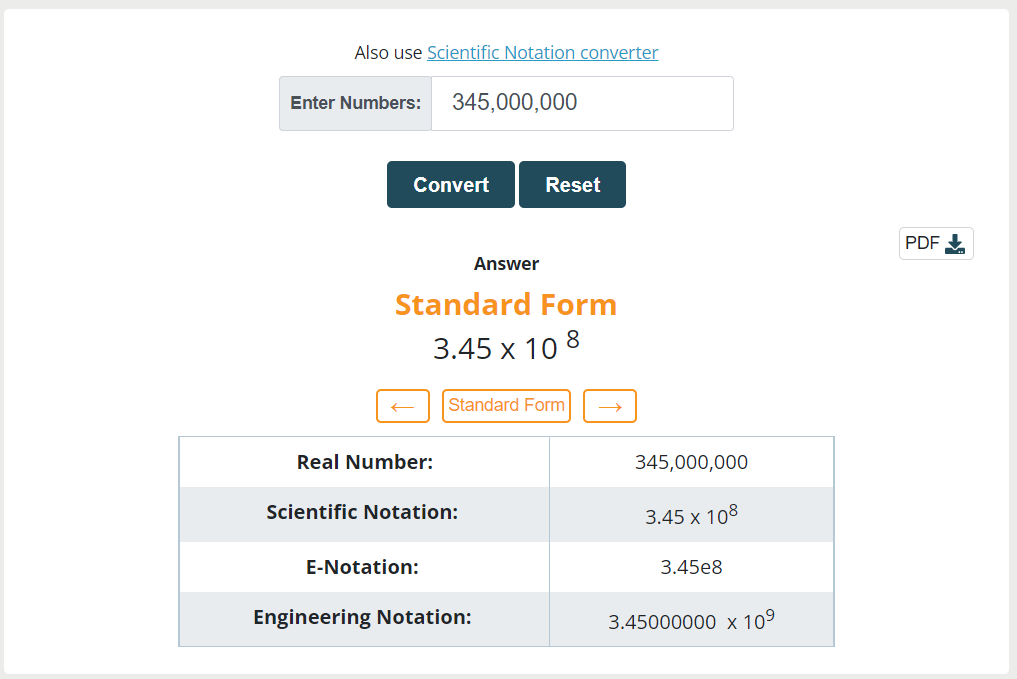
Convert 345,000,000 to standard form

Solution

Step 1: Put the decimal point after first significant digit.

3.45000000

Step 2: Count the digits after decimal point and write them in the power of 10.

3.45000000 x 10⁸

The decimal number is 3.45000000, and the power of 10 is 8, so to get the original value, the decimal point must be shifted 8 places to the right.

Step 3: Skip the zeros.

3.45 x 10⁸

You can also use online calculators to evaluate the standard form of numbers.


Example 2:

Convert 0.00000034 to standard form

Solution

Step 1: Put the decimal point after first significant digit.

00000003.4

Step 2: Count the number of decimal places to the right of the last non-zero digit. In this case, there are 7 decimal places to the left of the last non-zero digit.

00000003.4 x 10-7

Step 3: Skip the zeros.

3.4 x 10⁻⁷

Example 3

Convert this into standard form 12345.67

Solution

Step 1: Put the decimal point after first significant digit.

1.234567

Step 2: Count the number of decimal places to the right of the last non-zero digit. In this case, there are 8 decimal places to the right of the last non-zero digit.

12345.67 x 104

Example 4

Convert this into standard form 0.000000005.

Solution

Step 1: Put the decimal point after first significant digit.

000000000.5

Step 2: Count the number of decimal places to the right of the last non-zero digit. In this case, there are 8 decimal places to the left of the last non-zero digit.

000000000.5 x 10-8

Step 3: Skip the zeros.

5 x 10⁻⁸

Summary

In conclusion, the standard form is a helpful technique for standardizing and compactly expressing very big or very small numbers. It is a crucial tool in science, engineering, and mathematics since it makes computations, comparisons, and measurements simpler.

Everyone working in these fields should be able to translate numbers into standard form since it can improve the effectiveness of communicating complex thoughts and findings.
UEFI VS CSM: What's the difference?

You have probably heard of UEFI and CSM if you have ever experimented with operating systems, hardware, or overclocking. It is not enough to know what the acronyms mean and what they stand for; you also need to know what they do and how they work. This article will explain what UEFI and CSM are, why one is preferable in certain situations, and their difference.

What is UEFI?

UEFI stands for unified extensible firmware interface. In contemporary motherboards, this new type is the most prevalent. It provides more advantages than BIOS. Its ability to provide a user-friendly graphical user interface (GUI) is its most important feature (GUI). The BIOS offers a blue colour screen with options. Standard BIOS cannot identify large storage drives. Thanks to UEFI, which also supports large storage drives, this issue can be effectively solved.

What are the Advantages of UEFI?

  • Compatibility with modern hardware
UEFI supports contemporary hardware configuration, compatibility with newer device such as NVMe drives, USB 3.0 and modern processor, peripherals. 

  • Faster Booting process:
UEFI significantly reduces boot time compared to traditional BIOS, Resulting in Fast  system start up. 
  • It support Large storage device:
UEFI is work with GPT, It allow support for storage device larger then 2 TB. Unlike the limitation of the traditional MBR. 


What is CSM?

CSM stands for compatibility support module. For contemporary computers, the UEFI firmware comes with a tool that enables backward compatibility. Using CSM boot, you can perform legacy BIOS-style booting on a modern UEFI-based system. This can be useful if you want to boot from an old storage drive that doesn't support UEFI BIOS mode or if you are using an older operating system.

What are the Advantages of CSM?

  • Compatibility with older Operating System's
CSM is enables to booting and installation of older operating systems and that do not support UEFI, Such as Like, Windows XP, Windows 7, Older Linux distribution, and other legacy operating systems. 
  • Cost effective if Update
In CSM System allow only to update gradual upgrades of components, and need to avoiding for an entire system overhaul to support UEFI only setup. 

UEFI Vs CSM | Difference between UEFI and CSM 

  • CSM can only be used with 32-bit processors, whereas UEFI can work with both 32-bit and 64-bit processors.
  • UEFI does not support older versions of windows, CSM on the other hand, is compatible with a wider range of operating systems, including older versions of windows.
  • UEFI supports drives with a capacity of up to two terabytes(TB), and CSM, on the other hand only supports drives with a capacity of up to four gigabytes(GB).
  • UEFI offers faster boot times than CSM, and UEFI uses a faster boot loader than CSM.
  • UEFI BIOS mode uses GPT(GUID partition table), while The CSM BIOS mode uses MBR(Master boot record) disk partition table format.
  • From power-saving modes like sleep, reboot, and hibernation, UEFI boots almost immediately. It contains features that bypass the power on the self-test process, which slows down a CSM boot system.
  • UEFI can work with discrete drives, and CSM boot, the drive support is stored in ROM.
  • UEFI includes advanced security features, such as secure boot, which can help protect the system from malware and other security threats, due to the lack of these security features, CSM is more open to security risks.

Thank you for reading this article. Still, if you have any questions or queries in your mind on the UEFI Vs CSM then please ask us in the comment section below.

Explore more information:

  1. UEFI Vs BIOS
  2. UEFI Vs Legacy
  3. Advantages of Legacy system
  4. Disadvantages of Legacy system
  5. MBR vs GPT

Application of 8051 Microcontroller

Many different machines use the microcontroller 8051, mainly because it is easy to incorporate into projects or build machines around. The spotlight focal point includes the following applications of the 8051 Microcontrollers.

Application of  Microcontroller in day-to-day life devices:

  • Light sensing & controlling devices
  • Temperature sensing and controlling devices
  • Fire detection & safety devices
  • Industrial instrumentation devices
  • Process control devices
  • Consumers appliances
  • Home applications
Application of Microcontrollers in industrial control devices
  • Industrial instrumentation devices
  • Process control devices
  • Office
  • Communication system
  • Radio and networking equipment
Application of Microcontrollers in metering & measurement devices
  • Volt meter
  • Measuring revolving objects
  • Current meter
  • Remote sensing
  • Hand-held metering systems
8051 Microcontroller applications in Embedded systems
  • Arduino managed highly sensitive LDR-based power saver for street light control system
  • RFID-based electronic passport system for easy governance using Arduino
  • Arduino-based DC motor speed control 
  • Arduino-based line the following robot
  • Zigbee-based automatic meter reading system
  • Parking availability indication system
  • GSM-based electricity energy meter billing with onsite display 
  • 8051 Microcontroller-based wireless energy meter
  • Solar highway lighting system with auto turn-off in the daytime
  • Android phone speech recognition sensed voice command-based notice board display
  • PC mouse-operated electrical load control using the VB application
Thank you for reading this article. Still, if you have any questions or queries in your mind on the Application of 8051 Microcontroller then please ask us in the comment section below.

Explore more information:

Disadvantages of Legacy systems

Legacy describes the default boot procedure of the BIOS firmware. In accordance with a programmable order of priority, it keeps a list of all installed bootable storage devices, such as optical drives, hard drives, and floppy drives. The BIOS runs a power-on self-test when the computer is turned on. A brief single beep is then produced by the internal speaker to signify that the booting up is normal. The beep code helps with both code recognition and subsequent troubleshooting. In order to learn more about the Legacy system, let's look at the disadvantages of Legacy systems.

What are the disadvantages of the legacy system?

  1. Lack of innovation
  2. Productivity and performance
  3. Limited Flexibility
  4. Information security issue
  5. Cost-effective

Let us look at the Disadvantages of the legacy system and these are as follows

Lack of innovation

It is common knowledge that businesses are prevented from making changes that might be advantageous to them by the legacy system. Businesses are forced to innovate their systems and adapt to the times due to the inconvenience. Impacting business strategy and preventing organizations from making the most of their working hours.

Productivity and performance

Performance, efficiency, and productivity may decrease as a result of the aging of legacy systems.

Limited Flexibility

Data exporting from a legacy system can be incredibly laborious, messy, and time-consuming. Additionally, it is possible that new software won't accept the formats in which data is exported.

Information security issue

Due to their older technology and lack of support from the company or vendor who originally created them, legacy systems frequently pose a security risk, such as document security.

Cost-effective

Another drawback of legacy systems is the cost of maintenance. Any system will have costs, but maintaining a legacy system has significant costs and is ultimately probably more expensive than simply upgrading it.

Thank you for reading this article. Still, if you have any questions or queries in your mind on the Disadvantages of Legacy systems then please ask us in the comment section below.

Explore more information:

  1. Advantages of the Legacy system

Advantages of legacy systems

Legacy refers to the BIOS firmware's default boot process. It maintains a list of all installed bootable storage devices, including optical drives, hard drives, and floppy drives, in accordance with a programmable order of priority. The BIOS runs a power-on self-test when the computer is turned on. The internal speaker then emits a brief single beep to indicate that the booting up is normal. Both code recognition and subsequent troubleshooting are aided by the beep code.  So let us check out the Advantages of the Legacy system to know more about the Legacy system. 

Here are the most significant advantages of the legacy system

  1. Legacy systems are familiar
  2. Legacy systems are efficient for specific tasks.
  3. Legacy systems ensure continuity in business operations.
  4. Custom solutions that work.
  5. Legacy system replacement is painful

Let us look at the advantages of the legacy system and these are as follows

Legacy systems are familiar

One of the most frequent reasoning for keeping with a legacy system is that it gives you a sense of familiarity and comfort. Everyone is familiar with how to access records and use the software, so the entire workflow is seamless. As a result, it makes it simpler to complete daily tasks without any problems.

Legacy systems are efficient for specific tasks

Another benefit of a legacy system is its efficiency. Even though they are dated and old, some legacy systems continue to function flawlessly. The system is typically built for maximum capacity, and in the majority of cases, they continue to be dependable and durable. Even though they might be challenging to maintain, they are still effective for handling daily tasks.

Legacy systems ensure continuity in business operations

The delicate process of updating software or switching to entirely new technology could halt business operations. As an alternative, keeping things as they enable uninterrupted business operations.

Custom solutions that work

Exactly for their tasks and business objectives, companies developed specialized technical solutions when businesses first began to go digital 20 years ago. These systems continue to be used because they complete the required tasks and appear to be more dependable and exclusive.

Legacy system replacement is painful

Industrially all over the world are currently being replaced by numerous new technologies. However, any company may find it challenging to transition from an outdated system to brand-new technology. Additionally, you need to hire and train experts to use new software, as well as take into account all risks that come with it.

Thank you for reading this article. Still, if you have any questions or queries in your mind on the Advantages of Legacy systems then please ask us in the comment section below.

Explore more information: